
Creating a Test Plan - FCC NR-BS
The FCC NR-BS option is used for FCC / IC (ISED) certification testing of 5G NR base station products. Base station testing feeds the test signal via a signal generator (VSG) and measures the output with a spectrum analyzer (SA); no UE control is involved.
Basic Settings
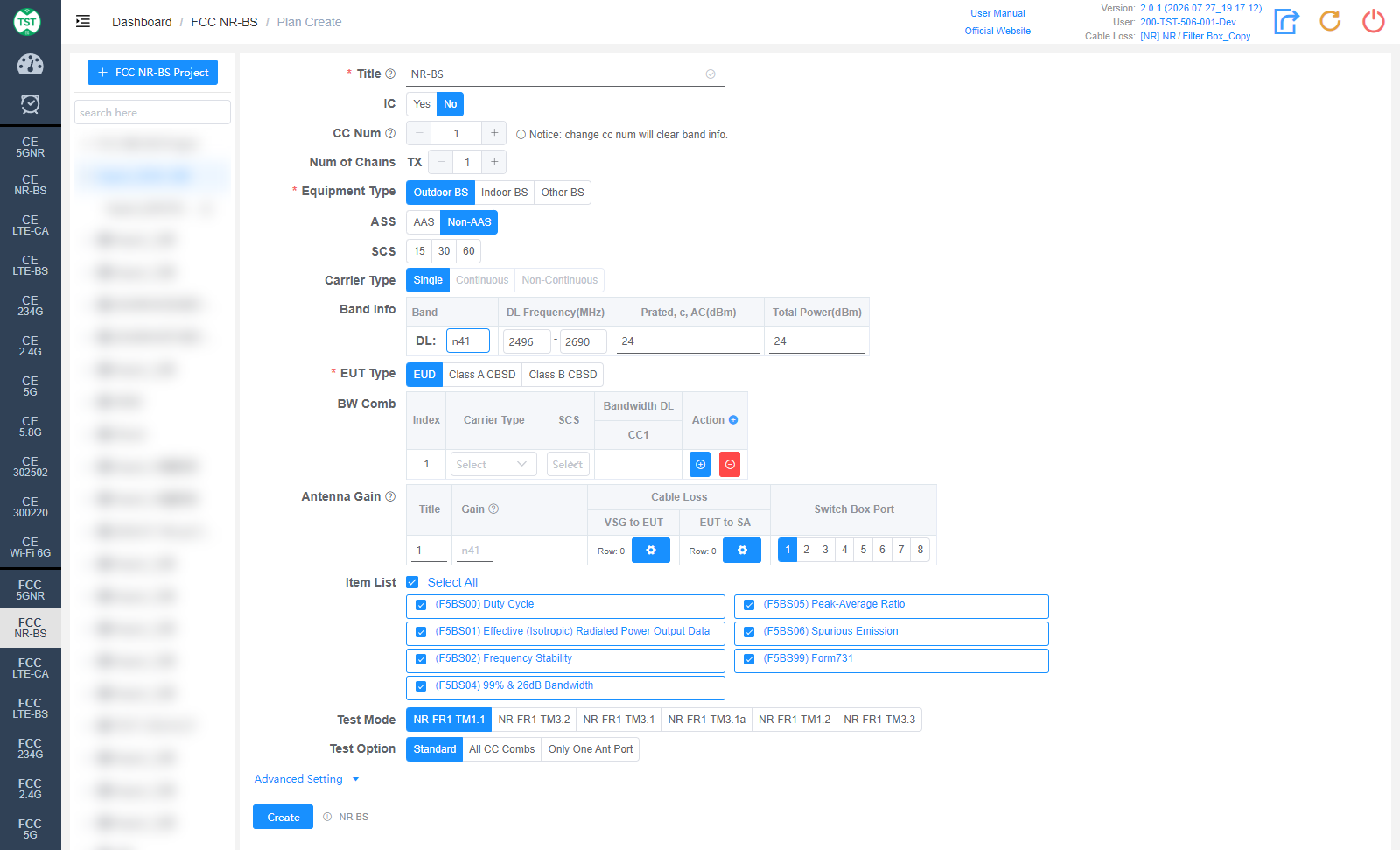
Title: Test plan name, entered by the user.
IC: Whether to test according to Canadian IC (ISED) requirements as well, default No.
CC Num: Number of carriers. Note: changing CC Num will clear the Band Info.
Num of Chains: Number of transmit chains (TX).
Equipment Type: Base station class (required): Outdoor BS / Indoor BS / Other BS.
ASS: Antenna system type: AAS / Non-AAS (Active Antenna System or not). Displayed after Equipment Type is selected.
SCS: Subcarrier spacings (kHz), multi-select: 15 / 30 / 60.
Carrier Type: Carrier types, multi-select: Single / Continuous / Non-Continuous.
Band Info: NR bands supported by the product:
Band: NR band number, e.g., n2 / n41 / n77. The downlink frequency is filled in automatically.
DL Frequency(MHz): Downlink frequency range, auto-filled and editable.
Prated, c, AC(dBm): Rated output power per carrier per antenna connector.
Total Power(dBm): Total output power.
EUT Type: Type of the equipment under test (required): EUD / Class A CBSD / Class B CBSD. CBSD applies to the CBRS band (e.g., n48).
BW Comb: Bandwidth combination table. For each Index, configure Carrier Type / SCS / Bandwidth DL and the bandwidth of each carrier (CC1...); use the +/- icons to add or remove combinations.
Antenna Gain: Antenna gain and cable loss configuration:
Title / Gain: Antenna number and gain (dBi).
Cable Loss - VSG to EUT: Cable loss from the signal generator to the EUT.
Cable Loss - EUT to SA: Cable loss from the EUT to the spectrum analyzer. How to Create Common Cable Loss.
Switch Box Port: Port number of the switch connected to the antenna.
Item List: Test items included in FCC NR-BS, all selected by default:
(F5BS00) Duty Cycle
(F5BS01) Effective (Isotropic) Radiated Power Output Data
(F5BS02) Frequency Stability
(F5BS04) 99% & 26dB Bandwidth
(F5BS05) Peak-Average Ratio
(F5BS06) Spurious Emission
(F5BS99) Form731 — FCC Form 731 report
Test Mode: 3GPP NR test models, multi-select: NR-FR1-TM1.1 / TM3.2 / TM3.1 / TM3.1a / TM1.2 / TM3.3. Select according to certification requirements.
Test Option: Test scope: Standard / All CC Combs (test all carrier combinations) / Only One Ant Port.
Continuous Type: Continuous carrier type: Standard / Non-Standard.
Advanced Setting
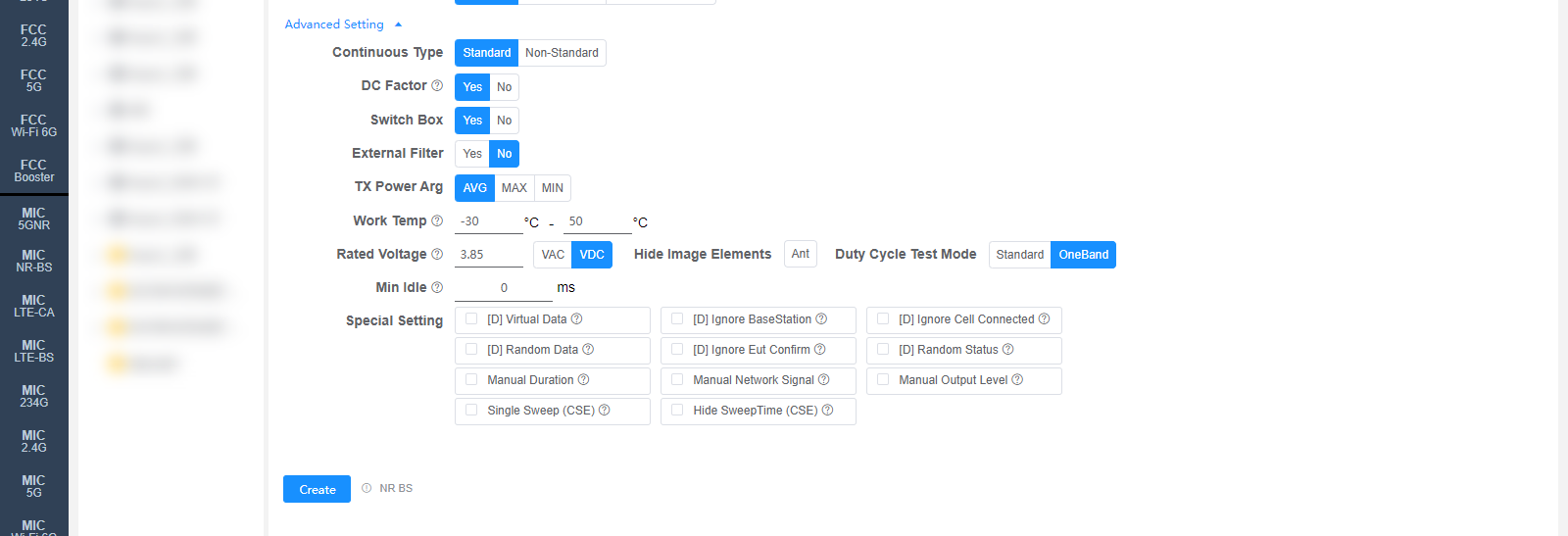
All settings in Advanced Setting can generally be kept at their default values. Adjust them only when the test results are abnormal or there are special test requirements.
DC Factor: Whether to enable duty cycle factor correction. For spurious emission tests.
Switch Box: Whether to use a Switch Box (RF switch).
External Filter: Whether an external filter is used in the RF path.
TX Power Arg: TX power evaluation method: AVG / MAX / MIN.
Work Temp: Normal operating temperature range (°C). Affects the frequency stability test.
Rated Voltage: Rated operating voltage (VAC / VDC). Affects the frequency stability test.
Hide Image Elements: Elements to hide in report images (e.g., the Ant marker).
Duty Cycle Test Mode: Standard / OneBand, default Standard. OneBand: a mode only measures one duty cycle.
Min Idle: Minimum idle time (ms) for the duty cycle test.
Special Setting: Special settings. Options prefixed with [D] are debug options:
[D] Virtual Data / [D] Ignore BaseStation / [D] Ignore Cell Connected / [D] Random Data / [D] Ignore Eut Confirm / [D] Random Status: Debug options.
Manual Duration: Set the Duration manually.
Manual Network Signal: Set the Network Signal manually.
Manual Output Level: Set the Output Level manually.
Single Sweep (CSE): CSE uses single sweep. Requires a retest to take effect (ReTest).
Hide SweepTime (CSE): Hide the CSE sweep time. Requires a recalculation to take effect (ReCalc).
Corresponding software option: NR BS